

Microsoft Edge 155.0.4283.45
Microsoft Edge is a fast, feature-rich Chromium-based browser that has evolved far beyond its meme-worthy origins. It offers multi-tab reasoning with Copilot for comparing information across open tabs, Journeys for organizing browsing history into topics, Voice and Vision for hands-free assistance, and a Copilot-powered New Tab Page. Performance is a standout, Edge uses less memory than Chrome and delivers better battery life on Windows 11, with Mac users also praising its efficiency. Security includes Defender SmartScreen, auto-unsubscribing from scam notifications, and enterprise-grade data protection with clipboard limits, watermarks, and protected downloads. Market share sits around 10-11% globally, though it's gaining ground in China. Available free on Windows, macOS, iOS, Android, and Linux, Edge is a genuine contender for anyone tired of Chrome's resource appetite.
- Free
- Windows
- macOS
- Linux
- Android
- iOS
- Nov 13, 2026
Screenshots
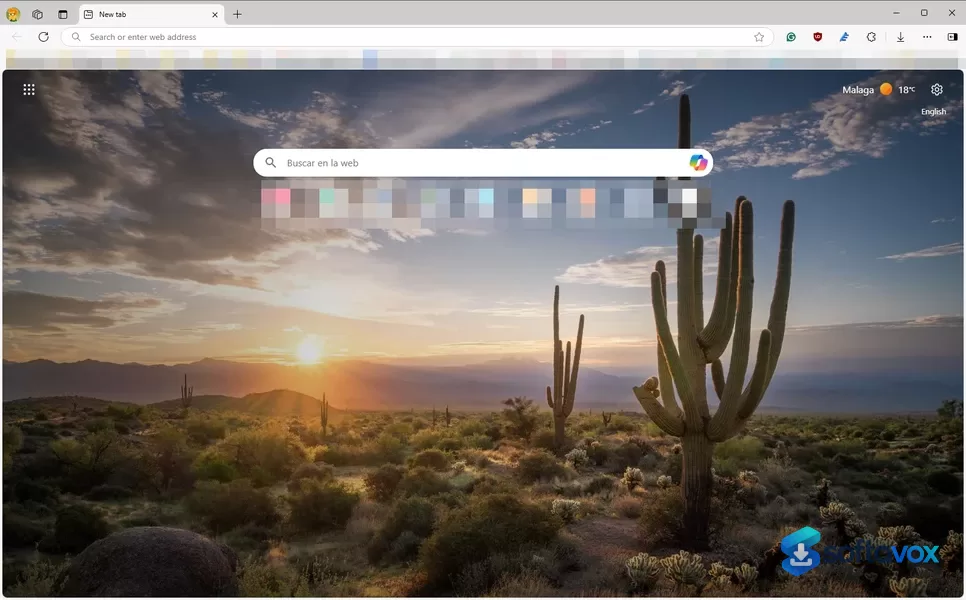
About Microsoft Edge
Microsoft Edge Download, Fast, AI-Powered Browser for Windows
TL;DR Quick Take / Who is this for?
Microsoft Edge has evolved from a basic Windows utility into a genuinely capable, Chromium-based browser that often outperforms Chrome in speed, memory management, and battery life on Windows 11. Its headline feature is the deep integration of Copilot, an AI assistant that can summarize web pages and PDFs, compare information across multiple open tabs, and even help you draft text or generate images directly from the sidebar[reference:0][reference:1]. Edge is the right pick for Windows users who want a fast, modern browser with powerful AI tools and excellent efficiency out of the box. It is not the best choice for users who are strictly privacy-focused, as Microsoft's data collection and AI features raise valid concerns, or for those who prefer a browser not tied to a single ecosystem.
Quick Info Box
| License Type | Freeware |
|---|---|
| File Size | Approx. 205–252 MB (installer varies by version and architecture)[reference:2] |
| OS Compatibility | Windows 10/11, macOS, Linux, Android, iOS |
| Latest Version | 156.0.4314.58 (Extended Stable Channel, October 2026)[reference:3] |
| Developer | Microsoft Corporation |
Key Features & Real-World Usability
Edge's most distinctive advantage is its performance engineering on Windows. Features like Startup Boost keep a lightweight background process running so the browser window appears almost instantly when you click the icon, a noticeable improvement over Chrome's cold starts[reference:4]. Sleeping Tabs automatically put inactive tabs to sleep to free up CPU and memory, which is why Edge is often cited as using less memory and delivering better battery life than Chrome, particularly on Windows 11[reference:5]. Benchmarks consistently show Edge opening in milliseconds and matching or beating Chrome in page load times, as both share the same Chromium engine[reference:6].
The Copilot AI integration is the other major pillar. It is not just a chatbot in a sidebar; Copilot can reason across multiple open tabs to compare information, summarize long PDFs, and even perform agentic browsing tasks on approved sites in Edge for Business[reference:7][reference:8]. The browser also includes a robust set of built-in tools like Collections for saving and organizing research, an Immersive Reader for distraction-free reading, and strong tracking prevention that is enabled by default. The interface is clean, modern, and supports vertical tabs and tab groups, making it manageable even with dozens of tabs open. However, the AI integration can be intrusive for some, with occasional Copilot suggestions interrupting typing or reading[reference:9]. The browser's deep ties to the Microsoft ecosystem (Bing, Microsoft 365) are a double-edged sword: convenient for some, but a source of friction for those who prefer Google services or a more agnostic experience[reference:10].
- Copilot AI Integration: Summarize pages and PDFs, compare tabs, and draft text with an AI assistant built directly into the browser sidebar.
- Startup Boost & Sleeping Tabs: Near-instant browser launches and automatic memory recovery from inactive tabs for snappy, efficient performance.
- Superior Memory & Battery Efficiency: Independent tests and user reports consistently position Edge as lighter on resources than Chrome on Windows.
- Built-in Productivity Tools: Collections for research, Immersive Reader for clean text views, and vertical tabs for managing many open pages.
- Strong Security Defaults: Tracking prevention, SmartScreen filter, and InPrivate browsing are enabled out of the box to protect against malicious sites.
- Cross-Platform Sync: Sync favorites, passwords, history, and open tabs across Windows, macOS, Android, and iOS devices.
Pros, Cons & Community/User Feedback
User sentiment around Microsoft Edge is positive on performance and features, but increasingly critical of its AI ambitions and privacy implications. On Software Advice, Edge holds a 4.6 rating from 578 reviews, with 71% of users recommending it[reference:11]. Reviewers frequently praise its optimization for Windows, with one noting it "feels as fast as Google Chrome but with much better privacy controls right out of the box"[reference:12]. The performance gains are real and measurable, with independent testing confirming Edge's Startup Boost and memory management give it a tangible edge for everyday use. The Copilot features are a major draw for productivity-focused users, offering a genuinely useful AI assistant that can work with the content you are already viewing.
However, the browser's reputation is increasingly mired in controversy. The most common complaint is privacy and AI data handling. A Microsoft Q&A thread warns that granting Copilot permission to access browser data can also give it access to other applications using the Edge WebView component, leading to accusations that it functions as a form of "spyware". Security researchers have also flagged that Edge was loading saved passwords into memory in plaintext, a serious flaw for a browser that markets itself on security[reference:14]. On the stability front, users report that performance can degrade significantly with a large number of tabs open (50+), with freezes and crashes being a recurring theme in reviews, particularly on mobile[reference:15][reference:16]. A JustUseApp reviewer summarized the frustration: "The issues far outweigh the benefits... This browser has good privacy, but the issues it has make it near unusable about half the time"[reference:17]. Another frequent criticism is the aggressive push of Microsoft services, with the default Bing search being a common pain point[reference:18].
Pros
- Excellent performance on Windows with Startup Boost and Sleeping Tabs for fast launches and low memory usage.
- Deeply integrated Copilot AI for summarizing, comparing tabs, and drafting text.
- Strong built-in security features like tracking prevention and SmartScreen.
- Productive tools like Collections, Immersive Reader, and vertical tabs.
- Free and available on all major platforms with seamless sync.
- High user ratings (4.6/5 on Software Advice) for ease of use and value.
Cons
- Significant privacy concerns regarding Copilot's data access and past security flaws like plaintext password storage.
- Performance can degrade with a large number of open tabs (50+), with reports of freezes and crashes.
- AI suggestions can be intrusive and interrupt the browsing experience.
- Deep integration with the Microsoft ecosystem (Bing, Office) can feel forced.
- Mobile app stability is frequently criticized, with reports of frequent freezing.
Final Verdict & Safe Download Advice
Microsoft Edge is the best browser for Windows users who value speed, efficiency, and cutting-edge AI features. Its performance optimizations make it feel faster and lighter than Chrome in everyday use, and Copilot, when used intentionally, is a powerful productivity tool that no other mainstream browser has integrated this deeply. The free price, cross-platform sync, and strong default security features make it an easy recommendation for most people.
The caveats are serious, however. The browser's aggressive push into AI and its deep ties to the Microsoft ecosystem come with genuine privacy trade-offs that users must actively manage. The history of security flaws and the potential for intrusive AI suggestions mean Edge is not a "set it and forget it" browser for the privacy-conscious. If you are comfortable with the trade-offs and willing to spend a few minutes in the settings disabling unwanted data sharing and AI prompts, Edge is a powerful, fast, and capable daily driver. If you prioritize a clean, open-source codebase and a transparent privacy policy above all else, Firefox or Brave remain safer alternatives.
- Download only from the official Microsoft website: The only safe source for the Edge installer is the official Microsoft page (microsoft.com/edge). Avoid third-party download portals, which may bundle adware or distribute tampered installers.
- Verify the installer size and version: The installer size varies by architecture (roughly 205–252 MB). The latest stable version is in the 150s range (e.g., 156.0.4314.58). A significantly smaller file or an outdated version from an unofficial source is a warning sign[reference:20].
- Check system requirements before installing: Edge supports Windows 10 and 11, macOS, Linux, Android, and iOS. Ensure your OS version is still supported to receive security updates.
- Review privacy and AI settings immediately after installation: Go to Settings > Privacy, search, and services to disable optional diagnostic data, personalized ads, and Copilot features you do not intend to use. This is the single most important step to reduce Edge's data footprint and prevent unwanted AI interruptions.
- Do not download "cracked" or "modded" versions: Edge is free. Any site offering a "premium" or "unlocked" version is distributing malware. The official installer from Microsoft is the only safe option.
Similar software



Key features
- Multi-Tab Reasoning, Copilot can compare and summarize information across multiple open tabs on desktop and mobile
- Journeys, Organizes browsing history into topics with summaries and suggested next steps
- Voice and Vision, Share your screen and talk through content hands-free with Copilot
- Copilot New Tab Page, Unified dashboard with calendar, Microsoft 365 files, and AI prompts
- Defender SmartScreen, Blocks malicious sites and phishing attempts; auto-unsubscribes from scam notifications
- Passkey Sync, Passwordless authentication syncs across devices (enterprise users)
- Enterprise Security, Cross-tenant Intune policies, clipboard limits, watermarks, protected downloads, and extension revocation
- Memory Efficiency, Uses less RAM than Chrome, especially on Windows 11; better battery life on laptops
- Sleeping Tabs, Puts inactive tabs to sleep to save resources and extend battery life
- Cross-Platform, Windows, macOS, iOS, Android, Linux
- Chromium-Based, Compatible with Chrome Web Store extensions
- Free, No cost, no subscriptions
Frequently asked questions about Microsoft Edge
Is Microsoft Edge safe to use?
Is Microsoft Edge free?
What is Microsoft Edge used for?
Does Microsoft Edge use less memory than Chrome?
Which devices does Microsoft Edge run on?
How do I update Microsoft Edge?
Versions
| Version | Release date | Platform | File size | |
|---|---|---|---|---|
| Microsoft Edge 155.0.4283.45 Latest version | Oct 8, 2026 | WindowsmacOSAndroidiOS | Download |
Comments about Microsoft Edge
No comments yet. Share your experience with this program!